Features

A full practice, on one platform

Charting, booking, intake, payments, and team management — designed around how integrative medicine clinics actually run. Every feature below is included on every plan, including the free one.

Clinical documentation

Charting that matches your training

Pick your profession, the presenting symptom, and the pattern — and a template loads with the fields you actually use. Charts come in six types: Initial, Follow-Up, SOAP, ACU/TCM, RMT, and blank for anything else.

  • TCM-native fields — tongue, pulse, palpation, differentiation, treatment principle, point prescriptions, and herbal formulas
  • Rich text editor with auto-save — nothing lost if the day gets busy
  • Digital signatures — sign with your saved signature and the chart locks
  • Version history — editing a signed chart creates a new version; the signed original is preserved for audit
  • PDF download — one click for referrals, insurance, or your college
  • Template library — build and version your own templates per symptom and pattern
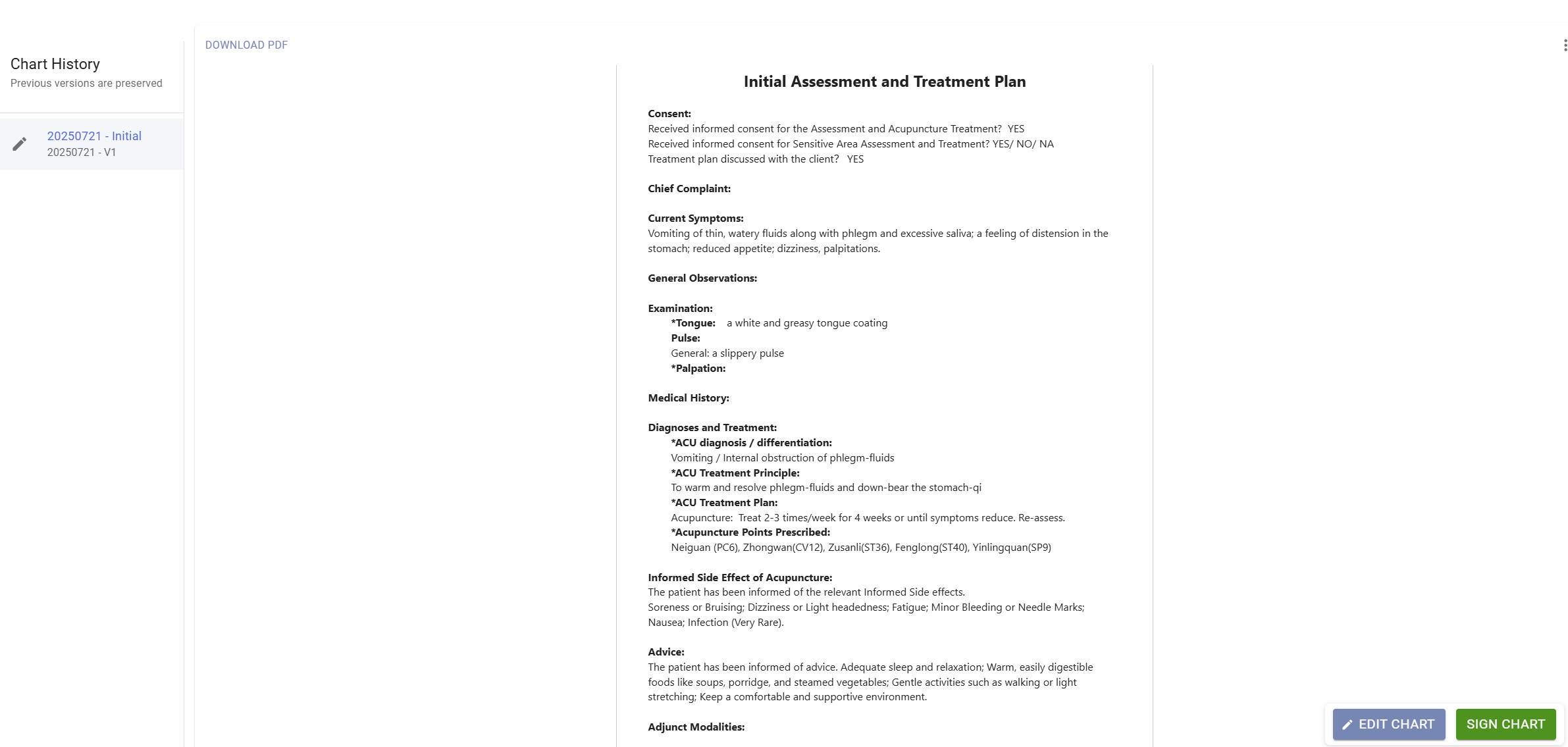
Chart · Initial Assessment and Treatment Plan
A LoyEco chart with TCM examination findings, differentiation, and prescribed acupuncture points
Scheduling

A calendar built for treatment rooms

Month, week, day, and agenda views. In clinic mode, the front desk sees every practitioner side by side in columns and books with a click and a drag.

  • Color-coded services — set duration, price, deposit, and color per service
  • Working hours & block times — per location, including recurring holidays and vacations
  • Drag to reschedule — with a confirmation step before anything changes
  • Attendance tracking — mark attended or no-show right on the booking
  • Waitlist — when a slot opens, offer it to the next patient; they get a time-limited link to claim it, and patients can watch their own queue from the portal
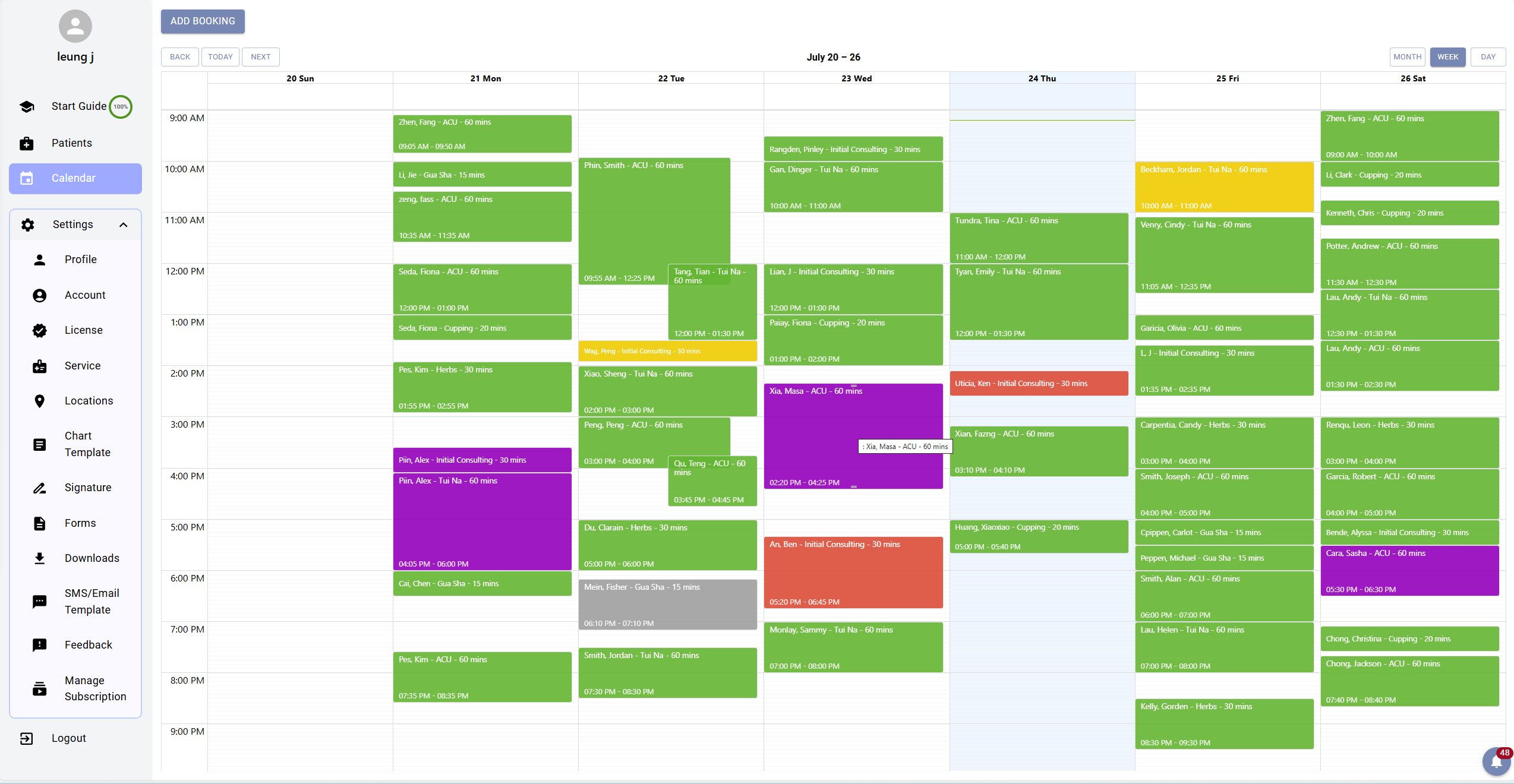
management.loyeco.net/booking/calendar
LoyEco weekly calendar with color-coded appointments
Online booking

Your own booking page, on your own terms

Every practitioner gets a booking page at their own custom link, with a personal welcome message and display name. Patients pick a service, see live availability that respects your hours and existing bookings, and confirm — from any device.

  • Your rules — minimum booking notice, how far ahead patients can book, same-day booking on or off
  • Slots are held for 15 minutes while a patient checks out, so two people never book the same time
  • Deposits via Stripe — the card is saved when booking, charged only on no-show, voided when the patient attends
  • Book for a family member — parents pick which dependent the appointment is for
  • Cancellation links — in every confirmation email, governed by your policy
  • Automated reminders — email and SMS, immediately and 24 hours before, using your own templates
  • Embed it — drop the booking widget into your existing website with a copy-paste snippet
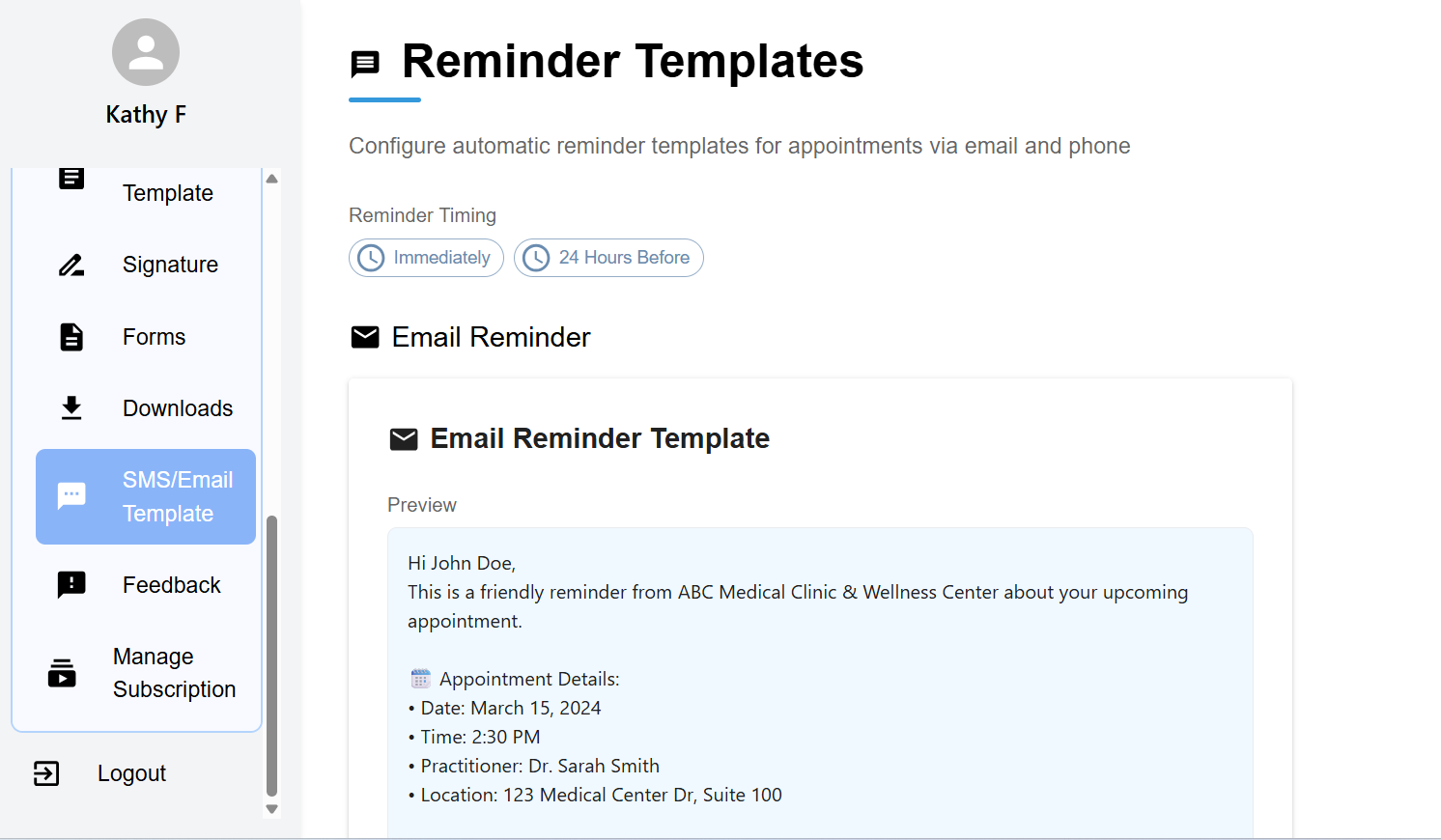
Settings · Reminder templates
Email and SMS reminder template configuration in LoyEco
Intake & consent

Forms patients actually complete

Build intake and consent forms with a drag-and-drop editor, or start from templates for acupuncture, cupping, hot stone, RMT sensitive-area consent, and PHI collection. Send by email, or show a QR code at the desk.

  • No login for patients — they open a unique link and fill it in on their phone
  • Electronic signatures — captured where the form requires them
  • Status tracking — see pending and submitted forms per visit
  • Auto-filed — submissions land on the patient's profile under Forms
  • Batch download — export a patient's documents in bulk when requested
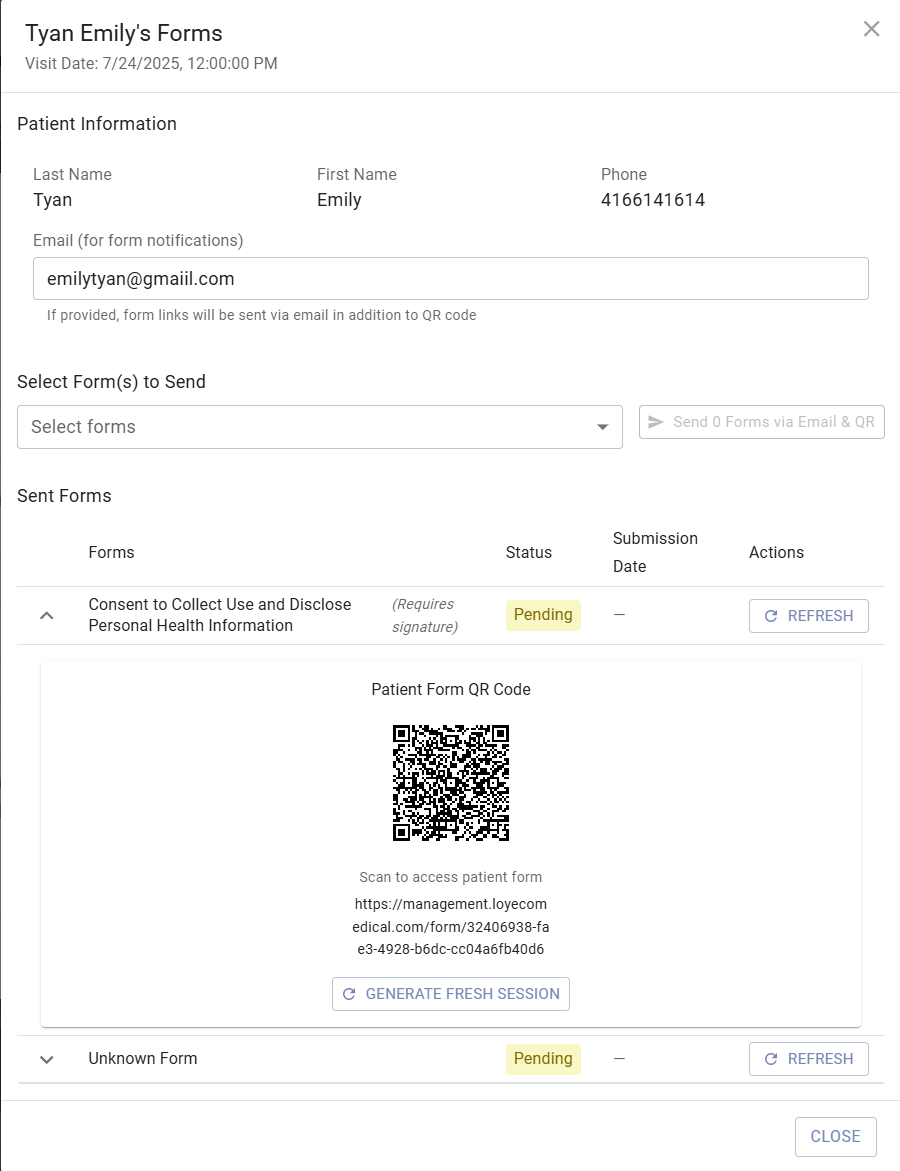
Forms · Send via email & QR code
QR code form delivery in LoyEco
For clinics

Run a clinic, not just a calendar

Create a clinic, invite your team, and switch between your personal practice and clinic mode with one click — each with its own patients, calendar, and settings.

Team invites with roles

Invite up to 10 members by email with a role attached — owner, practitioner, front desk, or assistant. Invites stay valid for 7 days, and wrong-account protection means the link survives a logout and account switch.

Front desk that can't see charts

Front desk sees every practitioner side by side in the day view and manages all bookings — but clinical notes are stripped from their view at the server, not just hidden.

Patient assignment

Assign each patient to a practitioner so caseloads stay clear, and assistants work only within their assigned practitioner's scope.

Clinic mode & personal mode

Practitioners keep a private personal practice alongside clinic work. Switch context from the avatar menu — LoyEco remembers where you were next time you log in.

Clinic-wide settings

The owner sees every practitioner's working hours, services, licenses, and block times in one place — organized per practitioner in tabs.

Clinic Stripe account

Connect a clinic-level Stripe account so clinic deposits and no-show fees flow to the clinic, separate from any practitioner's personal account.

Patients, families & paperwork

Records for families, receipts for insurers

Complete patient profiles

Contact details, health information, insurance info, emergency contacts, booking history, charts, forms, and uploaded files — in tabs on one page. Health data is encrypted at rest.

Family & dependents

Add child, spouse, parent, or sibling profiles under one account. Every booking, chart, and document is tied to the right family member — never mixed together.

Patient portal

Patients sign in to see upcoming and past appointments, documents, and their waitlist spot — filtered per family member — and can cancel or request a reschedule.

Invoices & insurance receipts

Generate an invoice from any booking — amount, tax, and payment method (cash, card, or insurance) — sign it, and email the PDF to the patient for insurance claims.

License management

Track your credentials — RMT, acupuncturist, TCM practitioner, osteopath, physiotherapist, chiropractor — with license numbers and expiry dates, linked to your services.

Patient files

Upload referrals, test results, and records to a patient's profile. Preview in the browser, control visibility, and download a whole patient's documents as one ZIP.

Direct SMS

Text a patient straight from their profile — or schedule the message to send later.

Real-time notifications

Bookings, cancellations, and form submissions appear in the in-app notification bell as they happen — no refresh needed.

Guided setup

A built-in Start Guide walks you from first login to a bookable practice — locations, services, working hours, signatures — and checks off each step as your data lands.

Platform & security

The boring parts, done properly

Encryption & access control

Personal health information is encrypted at rest. Role-based access keeps clinical notes away from anyone who doesn't need them.

Two-factor authentication

One-time email codes on login, with trusted devices so your own laptop doesn't nag you. Google sign-in supported.

Stripe Connect

Payments flow through your own Stripe account — personally or per clinic. LoyEco never holds your money.

API keys for AI agents

Generate named, revocable keys that give AI assistants read-only access to bookings, patients, and forms. An OAuth flow covers third-party apps.

Continuous updates

LoyEco runs the same software for everyone, updated continuously — no versions to install, no upgrade fees.

Support from the people who built it

Write to support@loyeco.net and you reach the founding team, not a ticket queue.

See it with your own charts

Everything on this page is free to use up to 30 patients and 50 charts. No trial clock.

Start free